
Planning events in today’s fast-moving business world demands more than spreadsheets and manual follow-ups. That’s where technology steps in. An automated event management system configured to generate documents, workflows, reports, and communications has become one of the most valuable tools for event planners, corporate teams, and marketing professionals across the United States.
Whether you’re organizing a 50-person corporate training or a 5,000-attendee trade show, this type of platform removes the repetitive burden from your team and replaces it with smart, rule-based automation.
How Automation Is Changing the Event Planning Industry
Gone are the days when event planners relied solely on email chains and manual task reminders. Modern event technology now uses intelligent workflows, trigger-based actions, and real-time data to handle tasks that once took hours. According to industry research, event teams using automation save an average of 12 hours per event on administrative work alone, time that gets reinvested into strategy, attendee experience, and creative execution.
In the US market, where corporate events, conferences, and hybrid experiences are booming post-pandemic, the demand for streamlined operations has surged. Platforms like Cvent, Eventbrite, and Bizzabo have all expanded their automation suites to meet this demand. The core shift? Moving from reactive planning (fixing problems after they happen) to proactive, rule-driven management where the software anticipates and acts before human intervention is needed.
Key areas being transformed include: registration confirmation flows, speaker coordination, vendor communication, post-event survey distribution, and real-time attendance tracking. Each of these once required manual input, now they run on preset logic that your team configures once and reuses across every event.
Core Features of an Automated Event Management Platform
When you look under the hood of a modern event platform, several capabilities define its automation power. Understanding these features helps you configure the system correctly for your specific event type and goals.
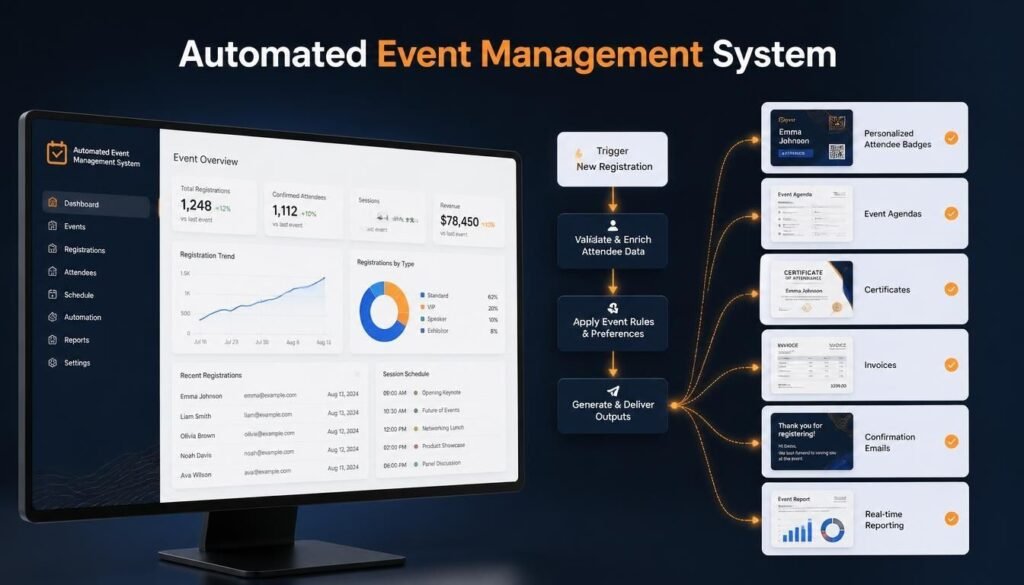
Trigger-based workflows are the backbone. You set a condition — “when a registrant selects a VIP ticket” and the system automatically generates a personalized confirmation email, adds the attendee to a premium access list, and notifies the check-in team. No manual steps required.
Dynamic document generation is another standout feature. An automated event management system configured to generate badges, agendas, invoices, certificates of attendance, and sponsor reports on demand saves significant production time. Templates pull live data from your registration database, so every document is accurate and personalized at scale.
Real-time reporting dashboards give planners instant visibility into registration numbers, revenue, session popularity, and attendee demographics. Rather than compiling data manually from multiple sources, the system aggregates everything automatically and presents it in digestible visual formats.
Multi-channel communication scheduling allows teams to set up entire email and SMS sequences weeks in advance. Reminders, schedule updates, last-minute logistics, and post-event follow-ups all go out at the right time to the right people — without anyone sitting at a keyboard hitting send.
Configuring the System to Match Your Event Goals
Configuration is where most organizations either unlock the full value of their platform or leave significant capability on the table. The setup process matters enormously. An automated event management system configured to generate the right outputs requires thoughtful mapping of your event workflow before you touch a single setting.
Start with a workflow audit. List every repeatable task your team handles for each event: registration confirmations, calendar invites, session reminders, dietary preference collection, sponsor deliverable tracking, post-event surveys. These become the inputs for your automation rules.
Next, define your data fields. Your system can only generate accurate documents and communications if the intake forms capture the right information upfront. Name, company, role, session preferences, dietary restrictions, t-shirt size for swag, all of it feeds the automation engine downstream.
Then build your trigger logic. Most platforms use an “if/then” structure: if an attendee registers for a workshop, then generate a calendar invite, send a pre-read document, and add them to the workshop-specific WhatsApp group or Slack channel. The more precise your triggers, the more personalized and impressive, the attendee experience becomes.
US-based teams should also consider compliance configuration. CCPA (California Consumer Privacy Act) requirements mean your system needs to handle data consent, opt-outs, and data deletion requests automatically. Building this into your workflow from the start avoids legal headaches later.
Measurable Benefits for US Event Teams
Beyond saving time, an automated event management system configured to generate consistent outputs delivers measurable ROI that justifies the platform investment. Here’s what organizations across the US consistently report after full implementation:
Error reduction: Manual data entry mistakes drop dramatically. When the system pulls attendee names, ticket types, and session data directly from the registration database into badges and certificates, typos become nearly impossible.
Faster revenue recognition: Automated invoice generation and payment reminders mean sponsors and exhibitors receive accurate billing documents faster, and outstanding balances get followed up on without anyone manually tracking due dates.
Better attendee experience: Timely, personalized communications build trust. When attendees receive relevant reminders, personalized agendas, and prompt responses to their questions, satisfaction scores improve, and return attendance rates follow.
Team scalability: A team of five can manage an event that previously required ten people when the right automation is in place. This scalability is particularly valuable for growing event companies and in-house teams managing multiple simultaneous events.
Common Questions
What exactly does an automated event management system configured to generate include?
It typically generates a wide range of outputs including confirmation emails, personalized agendas, attendee badges, certificates of participation, sponsor invoices, post-event reports, and survey distribution sequences. The specific outputs depend on how the system is configured and which templates are set up in advance.
How long does it take to configure an automated event management platform?
Initial setup for a mid-size event typically takes 2–4 weeks for a team new to the platform. This includes workflow mapping, template creation, data field configuration, and testing. Once your core templates and triggers are built, reusing them for future events takes just a few hours of customization.
Are automated event systems suitable for small businesses and nonprofits in the US
Absolutely. Many platforms offer tiered pricing that makes automation accessible to organizations running just a handful of events per year. Even small teams benefit enormously from automating registration confirmations, reminders, and post-event follow-ups, tasks that consume disproportionate time at any scale.
Getting Started: Choosing the Right Platform
The US market offers dozens of event management platforms, ranging from all-in-one enterprise solutions to lightweight tools built for specific event types. When evaluating options, prioritize platforms with strong automation builders, native integrations with your CRM and marketing tools, and US-based customer support. Look for free trials that let you test the configuration interface before committing.
Popular choices for US teams include Cvent (enterprise), Eventbrite (consumer and mid-market), Splash (brand-forward events), and Whova (conferences and expos). Each has a different automation depth, so map your must-have workflows before making a final decision.
Understanding what an automated event management system configured to generate can do for your organization is the first step toward transforming how your team operates. From dynamic document creation to intelligent communication sequences, the right platform turns your event workflow into a repeatable, scalable engine. For US-based event teams looking to do more with less, adopting automation isn’t just a competitive advantage, it’s quickly becoming the baseline expectation. Start with your highest-volume, most repetitive tasks, configure your triggers carefully, and let the system handle the rest.